Huawei Google Nexus 6P Hands-on Full Review(Detailed)
This is my first flagship smartphone, and the initial experience was amazing. First looks made to feel high end and metallic.Competitors: Main competitors in this price range (30,000-40,000) are Apple iPhone 6/SE, Samsung Galaxy S6, LG G4, Sony Xperia Z5/Z3, Moto X Force, Microsoft Lumia 950 XL and Nexus 5X.
Build Quality (9/10):
The outer body looks strong metallic and flagship. The build quality is upmarket and looks very rigid, with the gorilla glass 4.
Primary Camera (9/10): [12.3 MP, IR laser-assisted autofocus, f/2.0, Broad-spectrum CRI-90 dual flash, 1.55 μm pixels]
The main highlight of the smartphone is its Front Camera. Photos come with natural colors and pixels look clearer when compared to higher MP camera phones. It doesn't have a fancy number for counting Megapixels like other phones, the 12.3MP photos look better than 21MP photos on other smartphones and doesn’t look like the one who extrapolate 12MP lens to 21MP for the sake of specifications.
The stock Camera app has limited options with very basic features like self-timer, flash control, photo sphere, panorama, Lens Blur, HDR+ and save location.
Most appealing features of the camera are the dual flash which makes the photo look evenly exposed and more natural, Panorama photos look real with great quality and large pixel size. Some of the other features to explore are the Photosphere and Lens Blur. The HDR+ feature does really add more detail to your photos, so I use it almost for every photo.
Another interesting feature is the SmartBurst, it saves the best parts of a burst capture.
Secondary Camera (7.5/10): [8 MP, 1.4 μm pixels, f/2.4 aperture]
The selfie camera is 8MP and has a narrower aperture compared to the main camera, which means it lets less amount of light to enter the sensor. Photo clarity is very good, but its stock camera app lacks selfie beautification features. Although the beautification features can be fulfilled with third-party selfie camera apps.
Video Recording (9.5/10): [Rear camera supports 4K up to 3840 x 2160 pixels@30fps, Slow motion videos of 1280 x 720 pixels@240fps, Video Stabilization; Front camera supports 1920 x 1080 pixels@30fps]
Video recording is another great plus point of the phone features, it supports 4K video which looks decent with video stabilization option. HD Slow motion video looks great with natural lighting, it slows down your video playing to about 8x to show details at Hi-Res.
Basic Phone performance (9.5/10): [Nano SIM, LTE, 3-microphones]
It serves excellently its most basic feature for which is it in existence which is the call clarity and ability to catch network signal.
Call clarity is one of the best in the market, very rare or zero call drop experience. Volume is very high for phone calls and clearly audible with noise cancellation. Its 3-microphones (2 front, 1 rear) with noise cancellation and Dual front-facing stereo speakers can be really helpful for making calls.
Connectivity (9/10): [LTE cat. 6, Bluetooth 4.2, Wi-Fi 802.11 a/b/g/n/ac 2 x 2 MIMO, dual-band (2.4 GHz, 5.0 GHz), USB Type-C, NFC]
Internet speeds are good on 3G, yet to try on 4G networks. It supports a wide range of 4G bands (16) including LTE (FDD) - B1/2/3/4/5/7/8/9/17/19/20/28 and LTE (TDD) - B38/39/40/41
Its inbuilt cast feature works great with chromecast, with very less or no buffering while playing HD videos.
Bluetooth performance was satisfactory, tried transferring videos to Microsoft phones and it worked well. It struggles a bit to play music on Bluetooth car audio, Lumia 640 plays music better on BT car Audio.
The Wi-Fi connectivity was decent and had no issues connecting, was able to play 2560×1440 videos on YouTube without buffering.
It has a Type C USB port and data transfer speeds were satisfactory when tried with the provided Type-C USB cable. It has NFC (Near Field Communication) feature, which may have great usage in near future.
Speed/Response Time (8.5/10): [Qualcomm® Snapdragon™ 810 v2.1, 2.0 GHz octa-core 64-bit, Adreno 430 GPU]
It runs Marshmallow UI butter smooth, without any lag. The phone responds very quickly and it never hangs or shown any slow performance.
Screen (8.5/10): [5.7" Corning® Gorilla® Glass 4, WQHD (2560 x 1440) pixels, 518 ppi, 16:9, Fingerprint and smudge-resistant oleophobic coating]
The screen is huge at 5.7 inch with 518 ppi looks great on the hand. The AMOLED display is very bright and is readable in afternoon direct sunlight. Although it lacks a bit in showing up the colors, white looks a bit yellow at lower brightness.
It supports up to ten touch points and is very sensitive and smooth. Ambient light sensor is a bit slow in adjusting the brightness but is manageable.
The screen is protected with Corning® Gorilla® Glass 4 and Fingerprint and smudge-resistant oleophobic coating, but not sure for how many users it serves useful, as most of them use an external tempered glass screen protector.
Design (9/10): [Dimensions-159.3 mm x 77.8mm x 7.3 mm, 178 g]
The phone looks sleek with metallic sidelining and back cover. The camera unit on the rear is having a black glass surface with a small projection. The phone can be slippery because of its smooth metallic surface.
Video playback/Video Streaming (9/10):
Video playing is fun on Nexus 6P, with its high performing processor and 3GB RAM, powered with High-Speed 4G/Wi-Fi support. No lag, no buffering and never crashed even while playing 3GB Full HD files or playing 2K videos on YouTube. Colors come alive while playing with enough brightness. It lacks a proper video player, nevertheless, MX Player comes to the rescue. Love the Android market, all good things come for free.
Video playing adjusts to the phone screen which is already in a wide screen ratio of 16:9, and the onscreen navigation keys hide themselves.
It's a pleasure watching movies on the large 5.7” screen at 518 ppi resolution and with Dual front-facing stereo speaker.
Music Playback with speakers/earphone (8.5/10): [3.5 mm stereo headset connector, Graphical equalizer, Bass Control, Virtual surround]
Music playing experience on the stock android Play Music app was good, it has all the basic features like Graphic equalizer and Bass control. Its amazing sound clarity can be experienced only when using high end earphones, the provided earphone is good for attending calls, but not much worthful listening to music.
Its SoC doesn't support FM Radio, so FM Radio lovers will miss their favorite stations.Overall the music playing experience is something basic, and nothing special.
Gaming (9/10)[Adreno 430 GPU]:
It plays almost all games smoothly including the Asphalt 8 which I tried. The response was good and quick without any lag in performance.
Battery (8/10): [3450 mAh, Non-Replaceable, Fast charging]
The battery performance was pretty decent, it came for about 19hrs on heavy usage and on normal usage it came up to 42 hrs, which is very impressive. The main factor for its battery draining is its large and bright screen.
Battery charging supports fast charging on type-C USB, below are the findings from the intensive battery testing:
When the remaining battery touches 15%, the phone can be automatically set to enable Power Saver mode.
Video playing adjusts to the phone screen which is already in a wide screen ratio of 16:9, and the onscreen navigation keys hide themselves.
It's a pleasure watching movies on the large 5.7” screen at 518 ppi resolution and with Dual front-facing stereo speaker.
Music Playback with speakers/earphone (8.5/10): [3.5 mm stereo headset connector, Graphical equalizer, Bass Control, Virtual surround]
Music playing experience on the stock android Play Music app was good, it has all the basic features like Graphic equalizer and Bass control. Its amazing sound clarity can be experienced only when using high end earphones, the provided earphone is good for attending calls, but not much worthful listening to music.
Its SoC doesn't support FM Radio, so FM Radio lovers will miss their favorite stations.Overall the music playing experience is something basic, and nothing special.
Gaming (9/10)[Adreno 430 GPU]:
It plays almost all games smoothly including the Asphalt 8 which I tried. The response was good and quick without any lag in performance.
Battery (8/10): [3450 mAh, Non-Replaceable, Fast charging]
The battery performance was pretty decent, it came for about 19hrs on heavy usage and on normal usage it came up to 42 hrs, which is very impressive. The main factor for its battery draining is its large and bright screen.
Battery charging supports fast charging on type-C USB, below are the findings from the intensive battery testing:
- 0-100% charge with wall socket took less about 1:30 hrs
- 0-100% charge with USB cable through Laptop took about 2:30 hrs
- 100%-0% with about 19 hrs of heavy usage (30 mins playing Asphalt 8, 18 hrs on Wi-Fi, 24 mins voice call, 47 mins MX Player, 4 h 31 min screen on)
- 100%-0% with about 28 hrs of moderate usage(27 hrs on Wi-Fi, 40 mins Hotstar, 5 h 30 mins screen on, 21 hrs phone idle)
- 100%-0% with about 42 hrs of normal to less usage (4 h 20 min screen on, 1 hr MX Player, 30 mins voice call, about 10 hrs on 3G, about 20 hrs on Wi-Fi)
 |
| Battery usage screenshots |
Sensors (9.5/10): [Fingerprint sensor, Ambient light sensor, Accelerometer, Proximity sensor, Barometer, Hall sensor, Gyroscope, Andriod Sensor Hub, Digital Compass, GPS]
The phone is fully equipped with all essential sensors as a flagship should have. The basic sensors work decently including light sensor or proximity sensor, although the ambient light sensor is a bit slow in adjusting the brightness when suddenly exposing to varied light source. Gyroscope, Barometer, Magnetic field sensors are all accurate and performs well. Tried the Virtual Reality video on YouTube, and it plays smoothly, so it's perfectly VR ready. Still looking for the perfect VR Headset which suits Nexus phones.
Another useful feature is the step detector and counter, plugged with the inbuilt Google Fit app which gives accurate steps traveled along with distance covered, path taken on map, calories burned, and time taken. Compass is very accurate but lacks an inbuilt App, although Android Play App market is there for rescue.
GPS Navigation (9.5/10): [GPS, GLONASS, Digital Compass]
GPS position is very accurate and locks the position very quickly, Compass adds up to the GPS to give the proper direction for navigating. Google Maps at its best and fully optimized with accurate traffic updates and fast re-routing. It finds and locks the GPS position quickly without mobile coverage, just keep the Maps are preloaded to navigate offline.
Memory and Storage (8/10): [RAM 3 GB LPDDR4, Mass storage 32 GB/64 GB]
The phone is equipped with 3 GB of RAM, which is sufficient to run Marshmallow and almost every app on Android market. On most occasions it has about 1.2 GB of free RAM left. Even when there were about 30 apps running in background, I was able to switch between apps without having to reload the page. Which means the apps(if supported) will be cached in memory. 3 GB RAM may be sufficient for today's requirements, but may be by near future it may become obsolete. Google should have thought of having a 4 GB model.
It comes with an internal storage options of 32 GB and 64 GB, out of which 25 GB is usable on a 32 GB model. If you have to store more media then unfortunately you cannot expand the storage over a micro-SD card.
OS (9.5/10): [Google Android Marshmallow 6.0.1 with regular Android updates]
As always my love towards Android is ever increasing. With Marshmallow it runs smoothly and performs amazingly with great features. App switching is now made more fun with nice and smooth animation.
Every time Android releases a new version, Nexus phones are the first get them. Nexus also gets regular OTA security updates. So its software is future secured.
Ease of Use (9/10):
User Friendly interface but lacks capacitive navigation buttons. It has a RGB Notification LED but cannot be configured.
Some of the user friendly features:
Value for Money (8/10):
Priced about 35,000 INR for a 32 GB model, for silver model it costs 1000 bucks extra. Considering the price segment and features it offers, the price is a little higher but we cannot ignore the fact that its hardware is from a renowned brand Huawei and its a Google’s release with guaranteed software and security updates for many years.
Overall Rating: 9/10
The photos clicked on Nexus 6P are slightly warmer (Similar to Canon DSLR's), especially during low lighting. So a small auto color tuning can give a much better details. See the difference below.
Find out the 20 Must have free Android apps for Marshmallow..CLICK HERE
Share your experience with your valuable comments and ask me for anything more about the smartphone. Subscribe, I will keep you posted with any updates.
The phone is fully equipped with all essential sensors as a flagship should have. The basic sensors work decently including light sensor or proximity sensor, although the ambient light sensor is a bit slow in adjusting the brightness when suddenly exposing to varied light source. Gyroscope, Barometer, Magnetic field sensors are all accurate and performs well. Tried the Virtual Reality video on YouTube, and it plays smoothly, so it's perfectly VR ready. Still looking for the perfect VR Headset which suits Nexus phones.
Another useful feature is the step detector and counter, plugged with the inbuilt Google Fit app which gives accurate steps traveled along with distance covered, path taken on map, calories burned, and time taken. Compass is very accurate but lacks an inbuilt App, although Android Play App market is there for rescue.
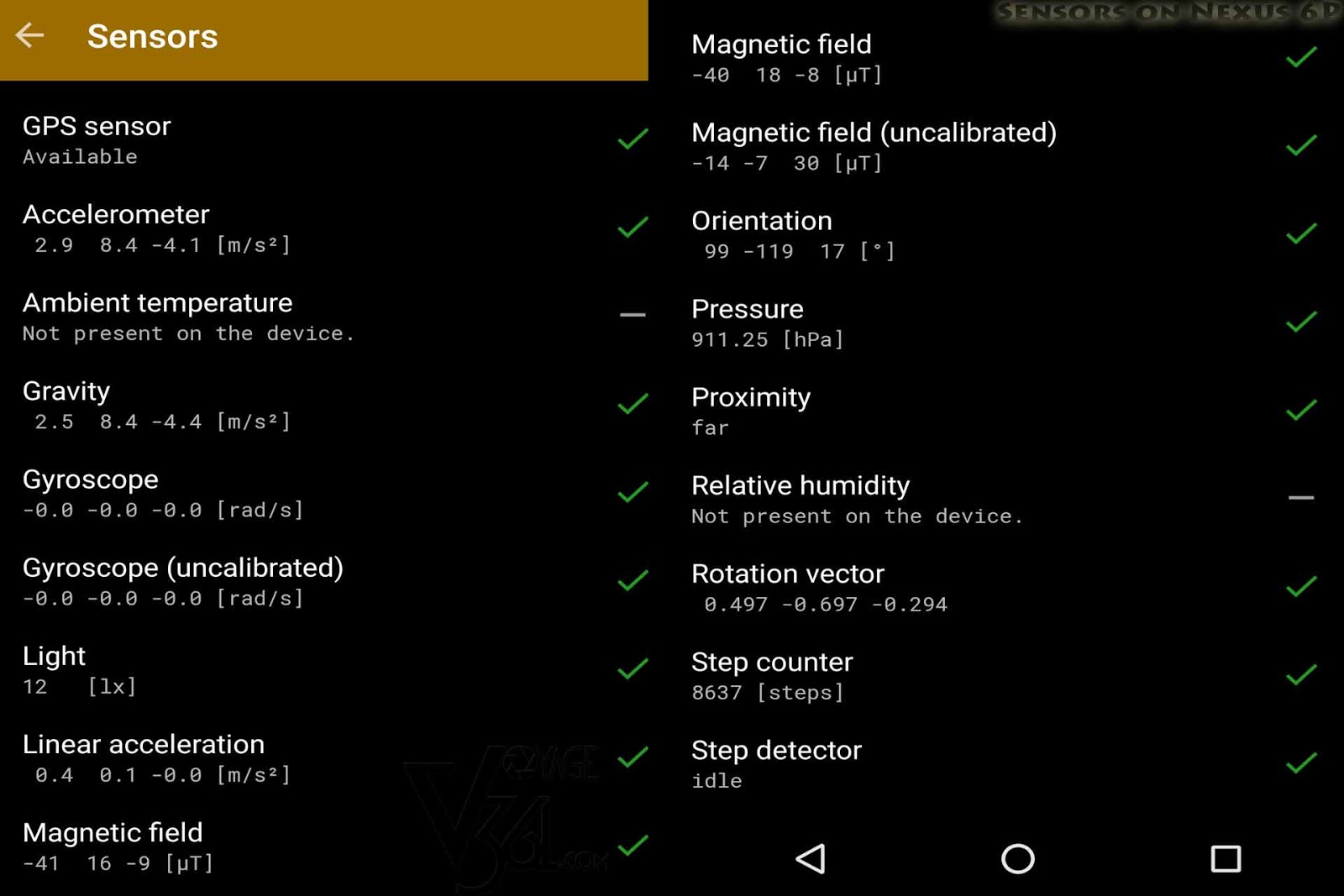 |
| Sensors test result on Nexus 6P |
GPS Navigation (9.5/10): [GPS, GLONASS, Digital Compass]
GPS position is very accurate and locks the position very quickly, Compass adds up to the GPS to give the proper direction for navigating. Google Maps at its best and fully optimized with accurate traffic updates and fast re-routing. It finds and locks the GPS position quickly without mobile coverage, just keep the Maps are preloaded to navigate offline.
Memory and Storage (8/10): [RAM 3 GB LPDDR4, Mass storage 32 GB/64 GB]
The phone is equipped with 3 GB of RAM, which is sufficient to run Marshmallow and almost every app on Android market. On most occasions it has about 1.2 GB of free RAM left. Even when there were about 30 apps running in background, I was able to switch between apps without having to reload the page. Which means the apps(if supported) will be cached in memory. 3 GB RAM may be sufficient for today's requirements, but may be by near future it may become obsolete. Google should have thought of having a 4 GB model.
It comes with an internal storage options of 32 GB and 64 GB, out of which 25 GB is usable on a 32 GB model. If you have to store more media then unfortunately you cannot expand the storage over a micro-SD card.
OS (9.5/10): [Google Android Marshmallow 6.0.1 with regular Android updates]
As always my love towards Android is ever increasing. With Marshmallow it runs smoothly and performs amazingly with great features. App switching is now made more fun with nice and smooth animation.
Every time Android releases a new version, Nexus phones are the first get them. Nexus also gets regular OTA security updates. So its software is future secured.
Ease of Use (9/10):
User Friendly interface but lacks capacitive navigation buttons. It has a RGB Notification LED but cannot be configured.
Some of the user friendly features:
- Quickly opening camera without unlocking the screen by pressing power button twice.
- Wake the screen when picked from flat surfaces to glance any new notifications or date and time.
- Unlock the phone by pressing your preconfigured finger on its rear fingerprint sensor to quickly unlock the phone are.
Value for Money (8/10):
Priced about 35,000 INR for a 32 GB model, for silver model it costs 1000 bucks extra. Considering the price segment and features it offers, the price is a little higher but we cannot ignore the fact that its hardware is from a renowned brand Huawei and its a Google’s release with guaranteed software and security updates for many years.
Overall Rating: 9/10
Recommendation: If your budget is about 20,000-30,000 INR then I would recommend going with this smart phone considering its performance and brand value, if you are looking for a trustable brand with decent features then this is an obvious choice.
Sample Pics clicked from Nexus 6P: (unedited, only watermarked & cropped to match the website standards)
Sample Pics clicked from Nexus 6P: (unedited, only watermarked & cropped to match the website standards)
 |
| Landscape, Buildings |
 |
| Colors & depth of field |
 |
| Outdoor, Landscape |
 |
| Night Photography. No flash used. Light source: street lights |
 |
| Same photo as above, only auto color tuned. |
 |
| Hi-Res Panorama |
Sample Videos clicked from Nexus 6P: (unedited, only watermarked)
Find out the 20 Must have free Android apps for Marshmallow..CLICK HERE
Share your experience with your valuable comments and ask me for anything more about the smartphone. Subscribe, I will keep you posted with any updates.
Comments
Post a Comment